How it works

You host the quiz live on a big screen and players answer the questions on their phones. Answers are marked automatically and the live leaderboard shows who’s in the lead. At the end of the quiz, the top 3 are revealed.

Read how it works for the quizmaster or for players.

For the quizmaster

How to create and host your quiz

You create the quiz on your laptop and show it on a big screen. You click through the quiz just like a presentation: the questions follow one after another, and now and then you show the live scores. At the end, the top 3 are revealed one by one, followed by the full leaderboard.

1

Create your quiz in the editor

Add questions with photos, video or music and choose a question type for each one. You can also set a time limit per question. Need inspiration? Start from our ready-made quiz questions. Is your quiz ready, or do you want to test it? Then start the quiz.

2

Show the quiz on a big screen

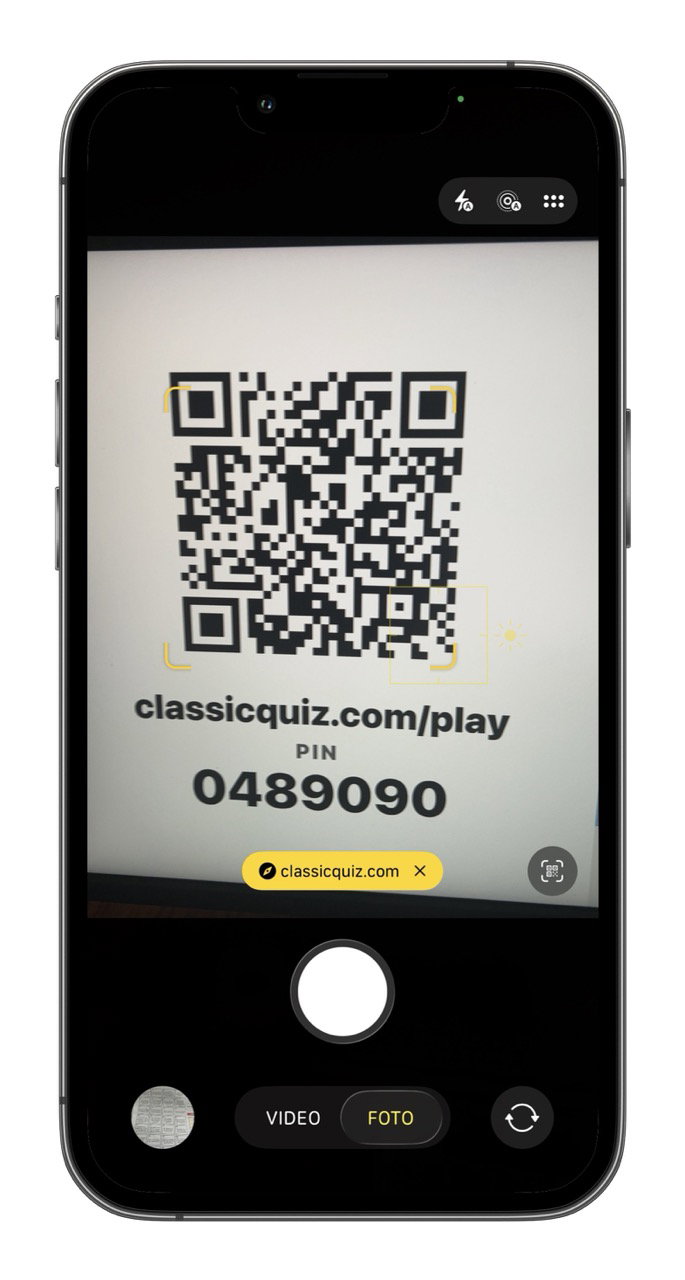
As soon as you start the quiz, a QR code appears on the screen. Players scan the QR code with their phone and enter their name to join. On a laptop or tablet, they go to classicquiz.com/play and enter the PIN.

3

Play the quiz

You click through the questions. Once everyone has answered, the quiz automatically moves on to the correct answer. Show the live leaderboard between rounds, and after the last question it’s time for the winners’ ceremony with the top 3.

Ready to create your own quiz?

Open the editor and add your first question.

For players

Join the quiz on your phone

Players answer the questions on their phones. After each question, you see whether your answer was right or wrong. Your phone also keeps track of your score and streaks automatically.

1

Scan the QR code

At the start of the quiz, scan the QR code, or go to classicquiz.com/play and enter the PIN shown on the screen. You can join on a phone, tablet or laptop. No app, no account.

2

Enter your name or team name

Pick a name the others will recognise. You’re now ready to go. Wait a moment until the quizmaster moves on to the first question.

3

Answer the questions on your phone

The question appears on your phone automatically. Depending on the question type, you tap the right answer or type it in. Your answer is sent and marked automatically.

Quick checklist

What do you need to host a quiz?

A laptop with internet

To create and present the quiz.

A big screen

A TV, projector or monitor big enough for everyone to see the questions, photos and videos.

Speakers & sound

So everyone can hear the music and sound clips during the quiz.

Players with a phone

A phone, tablet or computer on Wi-Fi or 4G/5G. No app to download.

Reviews

What our users say

Google review ★★★★★ Translated from German ·
“A really nice game”
Julia Ganz November 2026
Google review ★★★★★ Translated from Dutch ·
“Creating a quiz with ClassicQuiz is a real pleasure, partly thanks to the wide range of options and the clear interface. Playing the quiz with a group of 80 players divided into 14 groups went very smoothly, and all the participants were very enthusiastic.”
Peter Vermeulen November 2026
Google review ★★★★★ Translated from Dutch ·
“Fun quiz! I’ve added some extra questions myself and personalised the content by adding my own photos. There are plenty of options for changing the layout quite easily. I also ran the quiz via the web browser on my smart TV, which means you don’t have to share the quiz via a laptop or mobile phone.”
Richard November 2026
Google review ★★★★★ Translated from Dutch ·
“We used ClassicQuiz to create a fun family quiz to mark our 40th wedding anniversary. ClassicQuiz offers a wide range of features that you can use to make the quiz varied. There are various types of questions, and you can add photos and music. It’s easy to create and use. The quiz was a great success and we had a lot of fun with it!”
Yvonne Ruijzenaars October 2026
Google review ★★★★★ Translated from Dutch ·
“ClassicQuiz is brilliant! I’ve been using it for over two years, both for business purposes – such as staff outings or conferences – and privately, for quiz nights at the pub or street parties. Before that, I used Kahoot, but the link to YouTube suddenly stopped working. And that’s exactly the feature I use a lot. I also realised then that ClassicQuiz is much more user-friendly. And they respond very quickly if you have any questions. Brilliant!”
Koos Meijer October 2026
Google review ★★★★★ Translated from Dutch ·
“For our course’s 50th-anniversary celebration, we commissioned an online quiz which we were then able to edit entirely. The editor is very easy to use and offers a wide variety of question types. The quiz ran smoothly for as many as 150 people! A huge success and a brilliant addition to the anniversary celebrations.”
Arvid Hornyak October 2026
Google review ★★★★★ Translated from Dutch ·
“An excellent quiz for both creators and players. Extensive question options. And very affordable. Definitely recommended.”
aize terpstra October 2026
Google review ★★★★★ Translated from Dutch ·
“Really great quiz software. In my opinion, it’s the best tool if you want to create your own interactive quiz. It has a variety of fun question types, is easy to use, has a sleek design and offers plenty of options to customise the quiz exactly as you like. What’s more, the support is excellent and new features are constantly being added.”
Robin van der Sar September 2026
Google review ★★★★★ Translated from German ·
“A great tool – I got to grips with it quickly and it offered everything I needed. The quiz ran smoothly with 70 participants. Questions sent via the contact form were answered in full within 24 hours (in German).”
Joerg September 2026
Google review ★★★★★ Translated from Dutch ·
“I usually create pub quizzes myself in PowerPoint, but this time I wanted a shorter version that didn’t need to be marked manually. Sander was a great help whenever I wasn’t sure about something. In PowerPoint, I use other tools (videos and GIFs I’ve put together myself, etc.), so it took a bit of getting used to at first, but many of the ClassicQuiz tools were actually easier and more efficient than the ones I usually use (and I’ve heard they’re working on the rest 😉). I hope we can join forces, because I found Classicquiz really pleasant and easy to work with, and the service is excellent and very fast.”
Claudia Wierts August 2026
★★★★★ Translated from Dutch ·
“A great experience with Classicquiz! I had made a mistake myself, but Sander fixed it quickly and perfectly. The service is excellent and really customer-focused. On top of that, Classicquiz is a very handy tool for making a professional quiz easily, for business as well as personal use. Highly recommended!”
J Jan Daenen January 2026
★★★★★ Translated from Dutch ·
“At a party with 90 guests, family and friends, we played a quiz full of facts about our own family and friends. I tried out every option, and Sander was a huge help with background music and videos (and how I could do it better). I’ll run it again at Christmas, as my subscription (for 100 players) lasts until 7 January.”
B B&B Where Els December 2025
★★★★★ Translated from Dutch ·
“I compared and tried 8 quiz sites. This one was the hardest to find, but on price, ease of use and features it was by far the best. Unlike Kahoot, you can set YouTube start and end times and choose audio only, so I could make ‘guess the sound’ questions. The editor is user-friendly and it’s nice that you see straight away what your slide will look like; many sites don’t offer that. Price-wise it’s a bit more than a month’s Kahoot licence, but the better YouTube integration won it for me. Other quiz sites were more expensive or less user-friendly. All in all I think it’s a very good site where you quickly find your way around, and I was able to make a really fun quiz. It’s available in Dutch and there are sample questions you can add straight away if you’re short on inspiration.”
C Customer December 2024
Received by email ★★★★★ Translated from Dutch ·
“Works brilliantly! Very easy to put together your own quiz, and great that up to 100 people can take part. I’m very happy with it.”
M Monique BAM Telecom
Received by email ★★★★★ Translated from Dutch ·
“Classicquiz was really pleasant to work with. The participants loved taking part. It was also great that the quiz was fairly easy to put together.”
H Hendrike Werkvisie de Hoop
Received by email ★★★★★ Translated from Dutch ·
“Very handy and user-friendly, in German too! A real recommendation for other bars and cafés, or simply for a fun quiz night with friends.”
S Sander & Cherine Culucu Bar, Kleve
Received by email ★★★★★ Translated from Dutch ·
“We were very pleased with the quiz. A clear website and very user-friendly.”
B Björn Logisticon
Received by email ★★★★★ Translated from Dutch ·
“It’s a handy tool for making the quiz completely your own. Questions were answered incredibly quickly and feedback for improvements is taken on board. We’d definitely recommend it!”
P Patricia Pub quiz organiser
Received by email ★★★★★ Translated from Dutch ·
“We used Classicquiz for a team outing. Both the organisers and the participants were very happy with it. Very easy to organise.”
R Randy Team outing
Received by email ★★★★★ Translated from Dutch ·
“A pleasant and simple way to set up quizzes, and much more appealing than the alternatives. I use it every month in my online games event. The variety of question types is great!”
E Eline Tahapary Entreplayneur
FAQ

Frequently asked questions

How much does ClassicQuiz cost?

Paid plans start at €29.99. Choose a plan for a single event, or a yearly plan if you host quizzes more often. The price depends on how many players you expect. See all plans and pricing. You can try ClassicQuiz for free first.

What occasions is ClassicQuiz good for?

Anything where a group gets together: a quiz night or pub quiz, an office quiz, team building or a Christmas party, a birthday, a weekend away with friends or a family get-together. A quiz gets everyone involved and adds a bit of healthy competition. For inspiration, see our quiz questions for work colleagues and all quiz questions.

Can players do the quiz at their own pace?

No. You play the quiz live and together: everyone gets the same question on the big screen at the same time and answers on their own phone.

How many players can join?

The free plan lets up to 5 participants join. With a paid plan, 500 or more can play at the same time.

Do players need an app or an account?

No. Players scan the QR code or enter the PIN and play straight in their browser. No app, no account, no email address.

Can players play in teams?

Yes. Each team plays on one phone and enters a team name. That works well for an office quiz or a pub quiz, where each table or department forms a team.

What’s the easiest way to control the quiz?

During the quiz, a control bar appears at the top of the screen. You can also use the arrow keys on your keyboard or a presenter clicker, so you don’t have to stay next to your laptop.

What if not everyone has a phone or is comfortable using one?

Play in teams. Talk it over together and let someone who’s handy with a phone submit the answers. That makes the quiz work for older players too.

Can I host a virtual quiz over Zoom or Microsoft Teams?

Yes. Share your screen in Zoom, Microsoft Teams, Google Meet or any other video call. Players see the questions in the call and answer on their phones, so everyone can join in, wherever they are.

Can I try ClassicQuiz for free?

Yes, you can create and test a quiz for free. Tip: play through the quiz yourself first, so you know exactly how it works.

Can’t find your question? See all frequently asked questions.